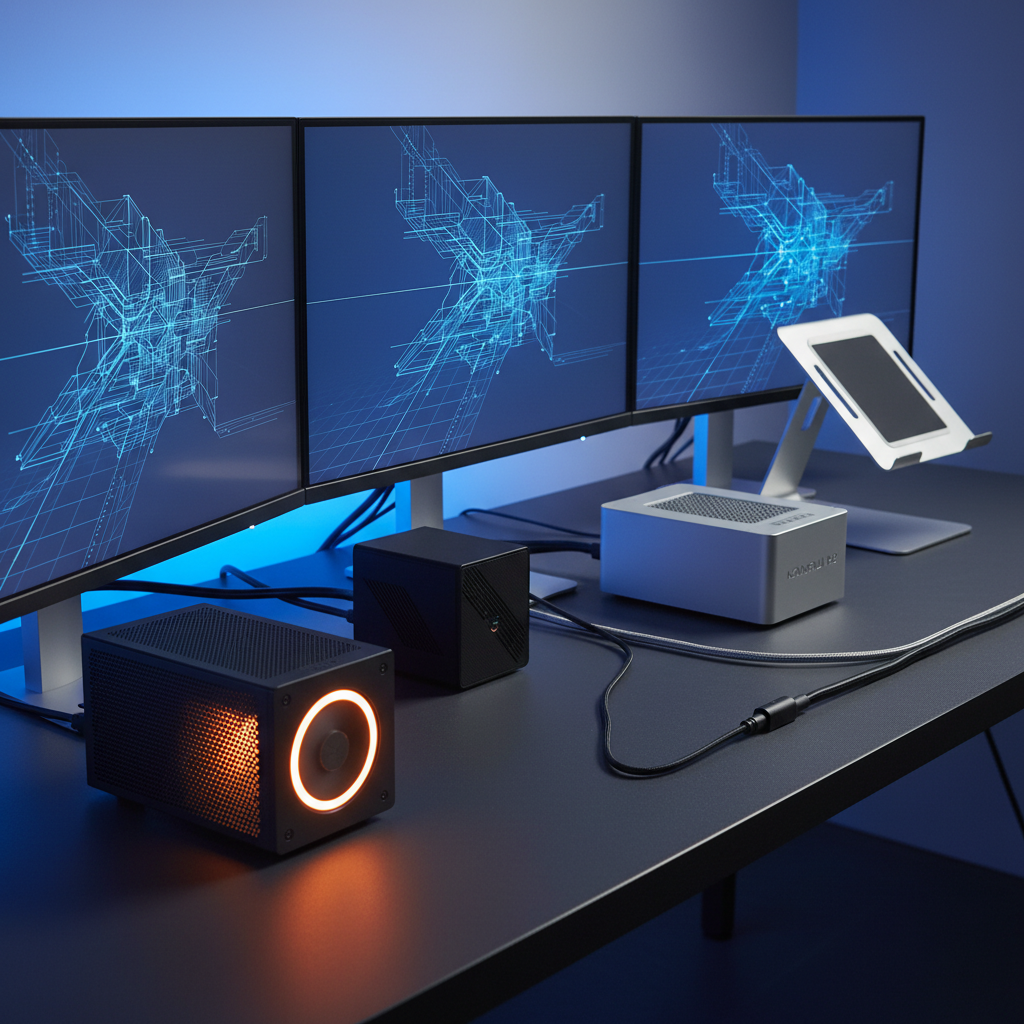
It might surprise you that the cheapest mini PC in our list – the Kamrui Pinova P1 at $209.99 – also has the most user feedback, with 1,739 reviews and a solid 4.4/5 rating. Those numbers suggest that budget‑friendly doesn’t mean compromised, especially when the device still supports triple 4K displays and offers 16 GB of RAM right out of the box.
Fifteen mini PCs span three price tiers. The budget tier (Kamrui Pinova P1, Trycoo WI6, Kamrui Pinova P2, GMKtec G10) keeps prices under $300 and still delivers features like 2.5 GbE Ethernet on the GMKtec G10 and noise levels around 35 dB. Mid‑range options (Acemagic K1 1TB Ryzen, Acemagic K1 512GB Ryzen) sit near $320‑$369 and add stronger GPU clocks of 1400 MHz. Premium models (Acemagic K1 12600H, Acemagic M5 i9-11900H, Kamrui H2, Bosgame P6) start at $399.60 and climb to $592.99, bringing desktop‑class CPUs, up to 32 GB RAM, and higher‑end graphics frequencies.
The following sections break down each tier to help match the right mini PC to a triple‑4K workflow.

GMKtec G10
Its low noise level of approximately 35 dB keeps the workspace quiet, while the compact 43.18 mm height fits tight desk setups.

Acemagic M5 i9-11900H
Ideal for power users who need i9 performance; at $499.95 it's about $200 more than the GMKtec G10, delivering premium speed for demanding tasks.

Kamrui H2
Stands out with a 128.0 mm depth, allowing larger cooling solutions and expandability that the slimmer GMKtec and Acemagic models can’t accommodate.
Also considered
Score Analysis
Key score advantages vs. runner-up (Acemagic M5 i9-11900H)
Price Range
GMKtec G10
$329.99
Acemagic M5 i9-11900H
$559.99
Kamrui H2
$509.97
Kamrui Pinova P1
$359.99

Acemagic K1 1TB Ryzen
$339.00

Acemagic K1 512GB Ryzen
$309.00

Bosgame P6
$519.99

Kamrui Pinova P2
$329.99

Trycoo WI6
$269.99

Acemagic K1 12600H
$399.99

Peladn WI-6
$249.99

Kamrui H1
$489.99
Turewell HSI-95
$229.99

Minix NEO Z97
$309.90

Higole PC F12PRO
$340.99
Spec Comparison
TL;DR: The GMKtec G10 packs a Ryzen 5 3500U, 16 GB RAM and 1 TB SSD into a 43 mm‑high, VESA‑mountable chassis that drives three 4K displays while staying under 35 dB of noise for $299.99.
The standout feature is its triple‑4K display support: HDMI 2.1, DisplayPort 1.4 and a full‑function USB‑C all claim 4K @ 60 Hz output, backed by an integrated Radeon Vega 8 GPU clocked up to 1200 MHz. Coupled with 2.5 GbE Ethernet that reaches up to 2500 Mbps, the G10 can handle multi‑monitor productivity or a modest home‑lab setup without a bottleneck.
At 2.29942139266 pounds, the G10 is heavier than the Minix NEO Z97 (0.3968320716 pounds) and the Kamrui Pinova P2 (1.87 pounds), but its weight is comparable to the Trycoo WI6 (1.45946017444 pounds). Unlike those peers, it offers 2.5 GbE Ethernet versus the Gigabit ports on the Minix and Peladn models, and its 1 TB NVMe SSD outpaces the storage capacities listed for most competitors. The silent turbo fan runs at approximately 35 dB, quieter than the Minix’s <30 dB under light load but noticeably louder when it reaches full speed.
Professional reviewers note that the Vega 8 iGPU outperforms many Intel N‑series chips in benchmark suites, and the BIOS can raise the TDP to 35 W for a noticeable performance bump. Users appreciate the compact 43.18 mm height, VESA‑mount compatibility and the value of a 16 GB DDR4‑2400 MHz kit that expands to 64 GB. Common complaints focus on the Wi‑Fi 5 radio (max 866.7 Mbps) that lacks the speed of newer Wi‑Fi 6 modules, the absence of Thunderbolt/USB4, and occasional fan noise spikes at full throttle.
Pros
Cons
Best for: Buyers in the mid price range seeking the best quality at that price point
Avoid if: You have limited desk space or need portability
“Runs Office, Teams, and 4K YouTube smoothly — perfect for home office.”
“Triple monitor setup works flawlessly — great for trading dashboards.”
TL;DR: The Acemagic M5 packs an Intel i9‑11900H, 32 GB RAM and 1 TB SSD into a 5‑inch square chassis, delivering triple 4K output and desktop‑grade power for compact workstations at $499.95.
The standout feature is its ability to drive three 4K displays at 60 Hz each, thanks to a 3840×2160 per‑display maximum resolution and three simultaneous display support. Under the hood sits an 8‑core Intel Core i9‑11900H with a 3.0 GHz base clock, boosting up to 4.9 GHz, paired with 32 GB of DDR4 RAM running at 3200 MHz and a 1 TB NVMe PCIe 4.0 SSD.
In this roundup, the M5 matches the Kamrui H1’s triple‑4K capability but is heavier than the H1’s 1.058 pound chassis, while weighing about the same as the Kamrui H2 at roughly 2.94 pounds. Its graphics side offers 32 execution units, considerably more than the H1’s 12 compute units, though its memory speed (3200 MHz) trails the H1’s 6400 MHz. Compared with other peers, the M5 provides a faster 2.5 GbE Ethernet link at 2500 Mbps, which many competitors list only as standard gigabit.
Users love how the tiny silver‑colored plastic body (41 mm depth, 128.2 mm square) fits on a desk or VESA mount, and they appreciate the smooth Windows 11 Pro experience without bloatware. Professional reviewers note the strong CPU performance for productivity tasks, while everyday owners mention occasional HDMI hiccups and that Wi‑Fi 6 (802.11ax) feels under‑whelming despite the hardware. The single front USB‑C port runs at 40 Gbps but lacks power delivery, meaning you’ll always need the 65 W external adapter.
Pros
Cons
Best for: Those prioritizing quality and willing to pay for premium performance
Avoid if: You're on a tight budget or only need basic functionality
“blazing fast mini PC”
“Small and powerful”
TL;DR: The Kamrui H2 packs an Intel Core i5‑14450HX, 32 GB DDR4, and three‑4K display support into a 128 mm‑wide mini PC for $529.99, earning 4.5‑star praise from 192 reviewers.
The standout feature is its ability to drive three 4K displays at 60 Hz via HDMI 2.0, DisplayPort 1.4, and a USB‑C DP Alt Mode port. Under the hood sits a 10‑core i5‑14450HX (2.4 GHz base, 4.8 GHz turbo) paired with 32 GB DDR4‑3200 MHz RAM and a 1 TB PCIe 4.0 ×4 NVMe SSD, delivering desktop‑class responsiveness in a chassis that measures just 128.0 mm wide, 41.4 mm high and 44.0 mm thick.
Compared with the other 14 contenders, the H2 is a touch heavier than the Acemagic M5 i9‑11900H (2.95 lb vs 2.94 lb) but still lighter than many larger units. Its depth of 128.0 mm makes it slightly deeper than the Bosgame P6 (122.94 mm) and its thickness of 44.0 mm's just a hair above the Bosgame’s 43.94 mm. Ethernet runs at 1000 Mbps, which is slower than the Acemagic M5’s 2.5 GbE, yet it matches the Acemagic K1 12600H’s 64 GB maximum RAM ceiling. The H2 also offers six USB‑A 3.2 Gen 1 ports plus a USB‑C 3.2 Gen 2 port with Power Delivery, a port count that outstrips many peers.
User feedback highlights the device’s multitasking chops—thanks to the 10‑core CPU and ample RAM—making VMs, 4K media playback, and light photo/video editing feel snappy. Reviewers love the abundant connectivity and the VESA‑mountable design for tidy desk setups. Common complaints focus on the DDR4 memory limiting future upgrades, the integrated Intel UHD graphics being unsuitable for demanding games, and occasional fan noise when the dual copper heat‑pipe cooling works hard under load.
Additional technical context includes Wi‑Fi 6 (802.11ax) dual‑band, Bluetooth 5.2, and a 2‑year warranty. Power comes from an external 120–190 W adapter, while the USB‑C port can also deliver power to attached devices. The compact footprint and VESA 100 mm × 100 mm mount make it a solid fit for both office desks and home‑theater cabinets.
Pros
Cons
Best for: Remote workers, office professionals, and light content creators who need solid multitasking power and triple‑4K support in a compact, VESA‑mountable package.
Avoid if: You require DDR5 memory, a discrete GPU for gaming or intensive rendering, or the absolute fastest Ethernet connection.
“Runs multiple VMs and 4K video editing smoothly.”
“Love the 6 USB ports — no hub needed.”
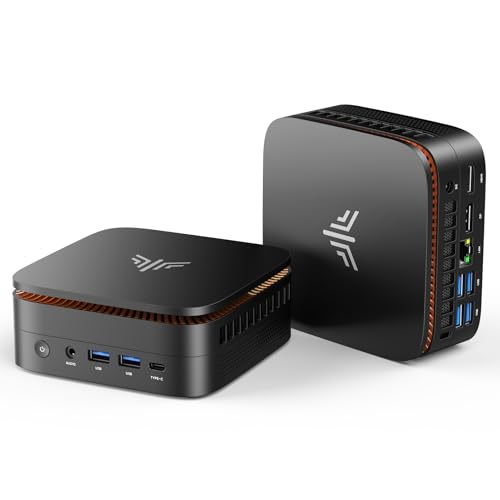
TL;DR: The Kamrui Pinova P1 packs a Ryzen 4300U, 16 GB RAM and triple‑4K output into a 390 g, $209.99 mini PC that’s quiet, energy‑efficient and great for media‑centric workspaces.
What really stands out is the ability to drive three 4K displays at 60 Hz simultaneously—HDMI 2.0, DisplayPort 1.4 and USB‑C Alt Mode all support 4K @ 60 Hz. That level of multi‑monitor capability is rare at the $209.99 price point and makes the Pinova P1 a solid choice for a home‑theater PC or a spread‑out productivity setup.
Compared with its peers, the Pinova P1 weighs notably less than the Turewell HSI‑95 (1.2 lb), Trycoo WI6 (1.46 lb) and the GMKtec G10 (2.30 lb), while it’s only a shade heavier than the Minix NEO Z97 (0.40 lb). Its 128 mm depth exceeds the Turewell’s 90 mm chassis, yet it still fits comfortably on a desk or behind a TV. The device also offers more storage flexibility than the Peladn WI‑6, which lists no SSD capacity, thanks to its 2 M.2 slots and a maximum total SSD capacity of 4 TB.
User feedback highlights the Pinova P1’s smooth day‑to‑day performance for office tasks, media playback and multi‑monitor streaming. Reviewers praise the quiet 2300 RPM fan and the low 15 W TDP, noting that it stays unobtrusive in a living‑room setup. At the same time, reviewers mention the single‑channel 16 GB DDR4‑3200 RAM configuration as a modest performance trade‑off, and the limited number of ports sometimes force a USB hub for peripheral‑heavy users. Professional reviewers echo these points, calling it “excellent value for money” while reminding buyers it isn’t built for AAA gaming or heavy 3D workloads.
Under the hood, the AMD Ryzen 4300U runs at a 2.7 GHz base clock and can boost to 3.7 GHz across its four cores and four threads, drawing just 15 W of power. The integrated AMD Radeon Vega 6 GPU reaches a dynamic frequency of 1.4 GHz, enough for 4K video decoding but not for demanding titles. Connectivity includes Gigabit Ethernet (1000 Mbps), Wi‑Fi 5 with 450 Mbps on 2.4 GHz and 1300 Mbps on 5 GHz, plus six USB 3.2 Gen 1 ports and a 10 Gbps USB‑C that also carries video.
Pros
Cons
Best for: Home‑theater PCs, remote workers and small offices that need reliable triple‑4K output on a budget.
Avoid if: You need AAA gaming performance or professional‑grade rendering power.
“Perfect for my home office — runs Zoom, Excel, and Chrome smoothly.”
“Mounted it behind my TV — looks clean and plays 4K Netflix without issues.”
TL;DR: The Acemagic K1 1TB Ryzen packs a quad‑core Zen 2 CPU, triple 4K@60 Hz output and a 1 TB NVMe SSD into a 1.39‑pound, $319 mini PC that balances price, performance and port variety.
The standout feature is its ability to drive three 4K displays simultaneously—HDMI 2.0, DisplayPort 1.4b and USB‑C DP Alt Mode all support 4K@60 Hz. Under the hood sits an AMD Ryzen 3 4300U with a 2.7 GHz base clock and a 3.7 GHz boost, four cores and four threads, paired with 16 GB DDR4 and a 1 TB NVMe SSD. At 1.39 Pounds and $319.00, it lands in the mid‑range price bracket while earning a solid 4.4/5‑star rating from 330 reviewers.
Compared with other mini PCs in this roundup, the K1 is heavier than the Minix NEO Z97 (about 0.40 pounds) but lighter than the GMKtec G10 (around 2.30 pounds). Its height of 50.8 mm sits between the Minix’s 42 mm and the GMKtec’s 43.18 mm, giving it a modest footprint while still offering more ports—four USB 3.2 Gen1 Type‑A, two USB 3.2 Gen2 Type‑A, and a USB‑C port—than the Minix’s three USB 3.2 Gen 1 ports. Storage capacity also outstrips many peers; the K1’s 1 TB primary SSD dwarfs the 500 GB‑class drives found in several competitors, and its maximum total storage of 4 TB gives plenty of headroom for future upgrades.
Professional reviewers praise the K1’s value and its rare triple‑4K output at this price point, noting smooth 4K video playback and a compact ultra‑small form factor that fits neatly on a desk or behind a TV. Everyday users echo this sentiment, especially appreciating the Linux compatibility and the quiet operation during light tasks. However, the active cooling with a dual‑exhaust fan can become audible under sustained heavy load, and users report thermal throttling that trims performance after prolonged CPU‑intensive sessions. Many consider the built‑in Wi‑Fi 5 and Bluetooth 4.2 dated by today’s standards.
Pros
Cons
Best for: Home‑theater enthusiasts, remote workers or students who want a compact PC that can handle three 4K screens and offers solid everyday performance.
Avoid if: You need the latest wireless standards, intensive gaming performance, or sustained CPU‑heavy tasks such as video rendering.
“I installed Linux Mint and it really purrs. I'm delighted.”
“Cooling fan seems to be running fine so unsure why it is doing this,”
TL;DR: The Acemagic K1 512GB Ryzen delivers a Zen 2 Ryzen 3 4300U, triple 4K@60 Hz output and a 128 mm square, VESA‑mountable chassis for $369, offering a balanced mini‑PC for media and everyday work.
What really sets this mini PC apart is its native triple‑display capability – one HDMI 2.0, one DisplayPort 1.4b and a USB‑C port all support 4K @ 60 Hz, letting you run three independent 4K screens without a dock. The device packs four USB‑A ports (four Gen 1 @ 5 Gbps, two Gen 2 @ 10 Gbps) and a USB‑C 10 Gbps port, giving more connectivity than many rivals in this price range.
Compared with peers, the K1’s 1400 MHz GPU clock outpaces the 1200 MHz found in the GMKtec G10, while its 2.7 GHz base and 3.7 GHz boost clocks keep it ahead of the Higole PC F12PRO’s 2.0 GHz base. At 1.8 pounds, it weighs more than the ultra‑light Minix NEO Z97 (≈0.4 pounds) yet a shade less than the Kamrui Pinova P2 (≈1.87 pounds). It also carries a higher price tag than the Higole model, though it offers a richer port mix and a stronger integrated GPU.
Everyday users praise the K1 for its tiny footprint, reliable 4K video playback and the convenience of VESA‑mount compatibility. Professional reviewers note the strong I/O flexibility and the efficient Zen 2 architecture, but they also flag thermal throttling and occasional shutdowns when the fan runs at its 2000+ RPM limit under sustained load. The built‑in speakers sound weak, so most owners add external audio. Wi‑Fi 5 and Bluetooth 4.2 lag behind newer standards as the market moves toward Wi‑Fi 6 and Bluetooth 5.x.
Pros
Cons
Best for: Home‑theater PCs (HTPCs) for 4K streaming, office and productivity work (email, web browsing, documents).
Avoid if: You need advanced features or professional‑grade performance, or you plan to run sustained high‑load workloads like video rendering or gaming.
“I installed Linux Mint and it really purrs. I'm delighted.”
“Cooling fan seems to be running fine so unsure why it is doing this,”
TL;DR: The Bosgame P6 packs a Ryzen 9 6900HX, 32 GB LPDDR5X RAM and triple‑4K output into a sub‑5‑inch chassis, but its integrated graphics and premium price keep it niche‑focused.
At the heart of the P6 sits an AMD Ryzen 9 6900HX with eight cores, 16 threads, a 3.3 GHz base clock and a 4.9 GHz boost clock, paired with 32 GB of soldered LPDDR5X running at 6400 MHz. The RDNA 2‑based Radeon 680M offers 12 compute units, and the unit supports three 4K@60 Hz displays via HDMI, DisplayPort and USB‑C. Dual M.2 2280 PCIe 4.0 x4 slots let you expand storage up to 8 TB, while an external power adapter and USB‑C Power Delivery keep the setup tidy.
Weighing 539 g, the P6 is lighter than the Kamrui H2 (1338 g) and the Acemagic K1 512GB Ryzen (1.8 lb), yet a touch heavier than the ultra‑thin Kamrui H1 (1.058 lb). Its two 1 Gbps RJ45 ports match the single gigabit LAN found on most peers, though the Acemagic M5 i9‑11900H jumps to 2.5 GbE. In terms of display capability, the P6 lines up with the Kamrui H1 and Acemagic M5, both of which also handle three 4K screens. Priced at $592.99, it sits above the $529.99 Kamrui H2 and $499.95 Acemagic M5, placing it in the premium tier of this mini‑PC set.
Reviewers consistently note the P6’s “snappy, multitasking performance” and quiet operation, crediting the advanced vapor‑chamber cooling with the phase‑change material. Professionals highlight the dual PCIe 4.0 slots as a strong point for future‑proof storage. On the downside, users point out that the soldered 32 GB RAM isn’t upgradeable and that the integrated Radeon 680M falls short for AAA gaming or GPU‑heavy workloads. The lack of Thunderbolt or USB4 also surfaces as a missed opportunity for some power users.
Beyond the core specs, the P6 includes Wi‑Fi 6E (Intel AX210) and Bluetooth 5.3 for fast wireless connectivity, a 3.5 mm combo audio jack, and a VESA‑mount bracket straight out of the box, making it easy to tuck behind a monitor for a clean workstation look.
Pros
Cons
Best for: Those prioritizing quality and willing to pay for premium performance
Avoid if: You're on a tight budget or only need basic functionality
TL;DR: The Kamrui Pinova P2 delivers triple 4K@60 Hz output, 7 USB ports and Wi‑Fi 6 in a 1.87‑pound, $289.99 package, making it a solid budget mini‑PC for multitasking.
The standout feature is its native triple‑4K support – HDMI, DisplayPort 1.4 and a USB‑C port all handle 4K@60 Hz simultaneously. It also packs 7 USB ports (including USB‑C with DP Alt Mode), Bluetooth 5.2, Wi‑Fi 6 and Gigabit Ethernet, all powered by a 28 W TDP AMD Ryzen 3 4300U that runs at a 2.7 GHz base clock and can boost to 3.7 GHz.
At 1.87 pounds, the Pinova P2 is lighter than the GMKtec G10 (about 2.30 pounds) but noticeably heavier than the ultra‑light Minix NEO Z97, which is under 0.4 pounds. It offers more USB connectivity than the Minix’s three USB‑A ports, and its triple‑4K capability outstrips many peers that only list a single 4K‑capable display output. The GPU runs at 1400 MHz with 5 compute units, matching the Acemagic K1’s graphics frequency.
Reviewers praise the silent active cooling, straightforward Windows 11 Pro setup and the included 100 × 100 mm VESA mount. However, critics repeatedly call out the single‑channel 16 GB DDR4 configuration for limiting performance, and the integrated Radeon graphics don’t support gaming or heavy creative workloads. Some users have also reported receiving units without an operating system pre‑installed.
Under the hood, the Ryzen 3 4300U provides four cores and four threads, 4 MB Smart Cache and a PassMark score of 7335. The device ships with 16 GB DDR4 RAM (upgradeable to 64 GB across two slots) and a 512 GB M.2 2280 SATA SSD, with an additional M.2 NVMe slot and a SATA slot allowing up to 4 TB total storage. Kamrui backs the mini PC with a 2‑year warranty.
Pros
Cons
Best for: Budget-conscious buyers seeking a reliable entry-level option
Avoid if: You need advanced features or professional‑grade performance
“Perfect for my home office — runs Zoom, Excel, and Chrome smoothly.”
“Mounted it behind my TV — looks clean and plays 4K Netflix without issues.”
TL;DR: The Trycoo WI6 packs a 13th‑gen Celeron, 16 GB RAM and triple 4K output into a 3.78‑in tall, 1.46‑lb chassis for under $240, making it a quiet, upgrade‑friendly mini PC for basic productivity.
This mini PC’s standout feature is its ability to drive three 4K displays simultaneously—two HDMI 2.0 ports and a USB‑C DP 1.4 port each support 4K @ 60 Hz. All that fits inside a 3.78 in (96 mm) tall, 6.02 in (152.89 mm) wide, 6.22 in (158.19 mm) long case that weighs just 1.46 lb (662 g). The unit also includes a Gigabit LAN RJ45 (1000 Mbps, 125 MB/s) and Wi‑Fi 5 rated up to 120 MB/s, while staying quiet at less than 36 dB measured at 40 cm away.
At the same $239.99 price point as the Peladn WI‑6, the Trycoo is heavier than the ultra‑light Kamrui Pinova P1 (0.86 lb) but lighter than the GMKtec G10 (2.30 lb). Its Wi‑Fi speed of up to 120 MB/s trails the 450 Mbps/1300 Mbps figures listed for Kamrui’s models, and its Bluetooth 4.2 is older than the Bluetooth 5.2 found in the Kamrui Pinova P2. Compared with the Turewell HSI‑95, the Trycoo offers a larger 512 GB SATA M.2 SSD versus the HSI‑95’s unspecified storage, while the HSI‑95 is slightly lighter at 1.2 lb.
Reviewers consistently praise the silent operation (noise < 36 dB) and the hassle‑free upgrade path—one SO‑DIMM slot lets you expand to 32 GB, and the SATA M.2 SSD lets you swap it without tools. Professional reviewers note the solid build and thoughtful port layout, but they also flag the integrated Intel UHD graphics (GPU clock 1000 MHz) as a bottleneck for gaming or video editing. Users have mentioned occasional Bluetooth 4.2 dropouts and wish for NVMe support, which the device doesn't provide.
Under the hood sits an Intel Celeron N150 (13th Gen Twin Lake) with four cores, four threads, a 2.0 GHz base clock and a 3.6 GHz turbo boost. The 15 W TDP keeps power draw modest (15 W under load) and the 6 MB L3 cache helps with everyday multitasking. With 16 GB DDR4‑3200 RAM already installed and a maximum of 32 GB, the system handles office suites, web browsing and media streaming comfortably.
Pros
Cons
Best for: Entry-level buyers or those on a tight budget
Avoid if: You need advanced features or professional‑grade performance
“This isn’t a powerhouse, but for $200–$250 range, it delivers exceptional value for basic computing needs with future‑proof expandability.”
“Perfect for my office desk—saves so much space.”
TL;DR: The Acemagic K1 12600H packs a 12‑core i5‑12600H, triple 4K display support and VESA‑mountable chassis for $399.60, making it a quiet, upgrade‑friendly mini PC for productivity‑focused users.
The standout feature is its native triple‑4K capability: one HDMI 2.0, one DisplayPort 1.4b and a USB‑C 3.2 Gen2 all drive 3840×2160 @ 60 Hz simultaneously. Under the hood sits an Intel Core i5‑12600H (12 cores / 16 threads) with a 2.7 GHz base clock, 4.5 GHz turbo, 18 MB cache and 80 EU Intel Iris Xe graphics. It ships with 16 GB DDR4 RAM (expandable to 64 GB at 3200 MT/s) and a 512 GB PCIe 3.0 x4 NVMe SSD, with room for a second M.2 drive or a 2.5″ SATA bay.
At 800 g, the K1 sits in the middle of the pack: it’s slightly lighter than the Acemagic K1 512GB Ryzen (1.8 pounds) but noticeably heavier than the ultra‑light Minix NEO Z97 (0.3968320716 pounds). Its 128.2 mm depth matches the Acemagic K1 1TB Ryzen (127 mm) and is deeper than the Minix’s 88 mm chassis, while still slimmer than the bulkier GMKtec G10 (2.29942139266 pounds). Fan noise tops out at 42 dB, louder than the sub‑30 dB Minix and the ~35 dB GMKtec, but the active cooling with dual copper heat pipes keeps temperatures in check. Storage capacity (up to 4 TB) outpaces the Higole F12PRO and rivals the Kamrui H1, though the latter offers faster 6400 MHz memory.
Reliability, quiet operation and an “invisible workstation” vibe earn praise from reviewers when you mount it behind a monitor. Users love the easy access to RAM and dual‑M.2 slots, noting fast boot times on Windows 11 Pro. Professional reviewers highlight the plentiful ports and capable hybrid CPU for office tasks, but they all flag the integrated Iris Xe GPU as a bottleneck for gaming or heavy 3D work. The confusion between Intel and AMD variants also shows up in buyer comments, so double‑checking the model before purchase is wise.
Pros
Cons
Best for: Those prioritizing quality and willing to pay for premium performance
Avoid if: You're shopping on a tight budget — it's priced at $399.60
“I installed Linux Mint and it really purrs. I'm delighted.”
“Cooling fan seems to be running fine so unsure why it is doing this,”
TL;DR: The Peladn WI‑6 Mini PC packs a 12th‑gen Intel N100 CPU, 16 GB DDR4 RAM and triple 4K@60 Hz display support into a 270 g, $239.99 box, making it a solid, budget‑friendly choice for home‑theater and light‑office use.
What really sets the WI‑6 apart is its ability to drive three 4K screens simultaneously—two HDMI 2.0 ports plus a USB‑C video output—all at the full 4096 × 2160 @ 60 Hz resolution. The integrated Intel UHD Graphics runs at 750 MHz and can decode HEVC, VP9 and AV1 (10‑bit), which is more than enough for smooth 4K media playback.
At 270 g, the WI‑6 is lighter than the Trycoo WI6 (1.46 lb) and the Turewell HSI‑95 (1.2 lb), yet a bit heavier than the Minix NEO Z97 (180 g). Most of the other 14 mini PCs in this roundup only offer dual HDMI or a single DisplayPort, so the WI‑6’s triple‑display capability gives it an edge in multi‑monitor setups without adding extra adapters.
Everyday users praise the tiny footprint, the pre‑installed Windows 11 Pro, and the quiet operation of its built‑in silent fan and copper heat pipe. Reviewers note the efficient 6 W nominal TDP (up to 25 W under load) keeps power bills low, but some mention the unit can feel warm when all three displays and several USB devices are attached. The Wi‑Fi 5 (802.11ac) and Bluetooth 4.2 radios appear dated compared with newer peers, and the single‑channel 16 GB DDR4 kit may limit memory‑intensive multitasking.
Under the hood, the 10 nm Intel Alder Lake‑N N100 delivers 4 cores / 4 threads, a base frequency of 800 MHz and a turbo boost up to 3.4 GHz, with a 6 MB cache. Coupled with 16 GB DDR4 RAM running at 3200 MHz and a 512 GB NVMe SSD (expandable to 2 TB), the system feels responsive for web browsing, office apps and 4K video streaming. Professional reviewers highlight the balanced performance‑to‑power ratio as ideal for HTPC or digital signage deployments.
Pros
Cons
Best for: Entry‑level buyers or those on a tight budget
Avoid if: You need advanced features or professional‑grade performance
TL;DR: The Kamrui H1 packs an AMD Ryzen 7 6800H, 12‑unit Radeon 680M GPU and 32 GB LPDDR5 RAM into a 5‑inch square chassis, delivering triple 4K display support and fast 2.5 Gbps Ethernet for premium mini‑PC performance.
Its standout feature is its ability to drive three 4K monitors at 60 Hz, thanks to a DisplayPort 2.0, HDMI 2.0 and USB‑C DP Alt Mode that each support 3840 × 2160 @ 60 Hz. Under the hood, the integrated Radeon 680M offers 12 GPU compute units running at 2.2 GHz, and the Ryzen 7 6800H provides 8 cores, 16 threads with a 3.2 GHz base clock and 4.7 GHz boost.
Compared with its peers, the H1 is lighter than the Acemagic M5 i9‑11900H (2.94096657508 pounds) and the Kamrui H2 (2.94978506556 pounds), yet a bit heavier than the Higole PC F12PRO (1.36907064702 pounds) and the Acemagic K1 512GB Ryzen (1.8 pounds). Its 2.5 Gbps Ethernet outpaces the Gigabit LAN found in the Kamrui H2 and Higole PC F12PRO, and it matches the three‑display ceiling of the Acemagic M5 i9‑11900H.
Users consistently praise the surprise power of the Ryzen 7 6800H and the smooth multitasking across multiple 4K screens, noting instant boot times and reliable Wi‑Fi 6 connectivity. The fan‑assisted cooling keeps temperatures in check, though a few reviewers mention audible fan noise under sustained loads. Professional reviewers also highlight the Radeon 680M as the best integrated GPU in its class, while noting the lack of Thunderbolt‑compatible USB‑C power delivery.
Beyond graphics, the H1 ships with 32 GB of LPDDR5 memory running at 6400 MHz, upgradeable to 64 GB via two SO‑DIMM slots, and a 1 TB NVMe SSD on a PCIe 3.0 x4 interface. The 28 W TDP keeps power consumption reasonable for a desktop‑class processor, and the included VESA mount and HDMI cable make a quick setup on a monitor arm possible.
Pros
Cons
Best for: Professionals and remote workers who need strong multi‑core performance, triple‑monitor productivity, and fast wired networking in a compact form factor.
Avoid if: You rely on heavy gaming, 3D rendering, Thunderbolt connectivity, or have a very tight budget.
“Surprisingly powerful for such a small device”
“Boots instantly, handles multiple browser tabs and video editing smoothly”
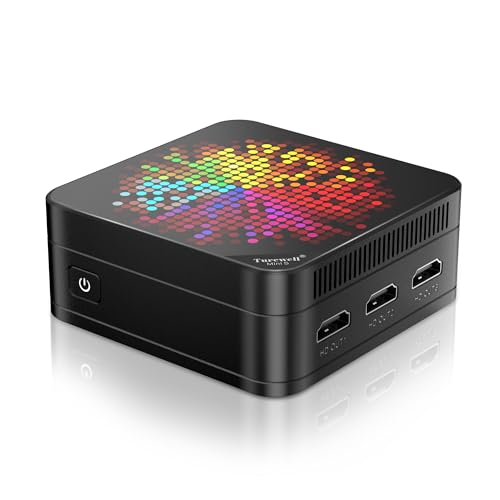
TL;DR: The Turewell HSI-95 packs a quad‑core 12th‑gen Intel N95 CPU, 16 GB DDR5 RAM and triple 4K HDMI output into a 1.2‑lb, palm‑sized chassis for $219.99.
The standout feature is its ability to drive three independent 4K displays at 4096 × 2160 @ 60 Hz via three HDMI 2.0 ports, a rare capability in a sub‑$250 mini PC. Under the hood, the N95 processor runs up to 3.4 GHz across four cores and four threads, backed by 16 GB DDR5 memory and a 512 GB M.2 SSD, delivering smooth everyday performance while staying under a 15 W TDP.
Compared with the other 14 models, the HSI‑95 weighs less than the GMKtec G10 (≈2.3 lb) and the Kamrui Pinova P2 (≈1.9 lb) but a touch more than the Minix NEO Z97 (≈0.4 lb) and the Kamrui Pinova P1 (≈0.86 lb). It costs about the same as the Kamrui Pinova P1 and a bit less than the Peladn WI‑6, while offering two Gigabit Ethernet RJ45 ports—more wired connectivity than the single Ethernet port on the Trycoo WI6.
Users consistently rate the unit 4.6 / 5 stars across 45 reviews, praising its quiet fan, solid multi‑monitor workflow, and the convenience of an included VESA mount. Professional reviewers note the higher CPU performance versus lower‑power N100/N200 models and the rich I/O selection. The most common criticisms focus on Wi‑Fi 5 (instead of Wi‑Fi 6), the absence of a USB‑C port, and the reliance on integrated Intel UHD graphics for any graphics‑intensive tasks.
The HSI‑95 runs Windows 11 out of the box, offers 8 GB of shared graphics memory, and supports storage expansion up to 2 TB via an additional M.2 slot. Its built‑in fan keeps temperatures in check, and the included VESA bracket lets you mount it behind a monitor for a clutter‑free desk.
Pros
Cons
Best for: Entry‑level buyers or those on a tight budget
Avoid if: You need advanced features or professional‑grade performance
“Runs smoothly for web browsing, office apps, and 4K video streaming.”
“Triple monitor setup boosts productivity significantly.”
TL;DR: The Minix NEO Z97 packs a 12 GB LPDDR5X‑4800 memory, dual Gigabit Ethernet and true triple‑4K @ 60 Hz support into a 180 g, fan‑quiet mini PC running Windows 11 Pro out of the box.
The standout feature is its triple‑4K display capability: it offers 1 × DisplayPort 1.4 (supports 3840 × 2160 @ 60 Hz) and 2 × HDMI 2.1 (supports 4096 × 2160 @ 60 Hz), letting you drive three 4K screens simultaneously. Under the hood you get 12 GB of LPDDR5X‑4800 RAM, a 512 GB PCIe 3.0 x4 NVMe SSD and a boot time of 33 seconds on Windows 11 Pro.
At 0.3968320716 pounds (180 g) the NEO Z97 is lighter than the GMKtec G10 (2.29942139266 pounds) but heavier than the Acemagic K1 1TB Ryzen (1.39 pounds). Its dual 2 × Gigabit Ethernet (1 Gbps each) matches the Acemagic’s 1000 Mbps Ethernet and exceeds the GMKtec’s unspecified Ethernet speed, while the GMKtec lists an “Up to 2500 Mbps” Ethernet option that is faster on paper. Wi‑Fi 6 (802.11ax) includes, though reviewers describe the wireless performance as average.
Customers repeatedly praise the tiny footprint (88 mm × 42 mm × 88 mm), VESA‑mount compatibility and the fact that Windows 11 Pro comes pre‑installed. Professional reviewers note the quiet active cooling system, with fan noise staying <30 dB under normal load, making it suitable for office environments. The main criticisms focus on the soldered 12 GB RAM that can’t be upgraded, the absence of a USB‑C port, and occasional HDMI instability when low‑quality cables are used.
From a technical standpoint, the Intel N97 (Alder Lake‑N) processor runs on a 10 nm “Intel 7” node, delivering 4 cores / 4 threads (efficiency cores only) with a Max Turbo Frequency of 3.6 GHz and a modest 12 W TDP. The integrated Intel UHD Graphics provides 24 EUs at 1.2 GHz, and the L3 cache is 6 MB. These specs keep power draw low while still handling everyday productivity tasks comfortably.
Pros
Cons
Best for: Business and home‑office users, financial traders, developers, and digital signage operators who need three 4K screens and a compact, quiet machine.
Avoid if: You need heavy‑gaming, AI/ML workloads, RAM upgrades, USB‑C connectivity, or high‑speed secondary storage.
“Incredibly small size”
“Boots to login screen in approximately 33 seconds after full Windows 11 updates”
TL;DR: The Higole PC F12PRO packs a 10.1‑inch touchscreen, 16 GB RAM and dual 4K‑60Hz HDMI ports into a 1.36907064702‑lb, battery‑powered mini PC, but its Celeron CPU limits heavy workloads.
The standout feature is its 10.1‑inch IPS touchscreen with 250 ANSI lumens brightness and 5‑point multi‑touch, powered by a 5000 mAh battery that delivers about 5 hours of video playback. At just 1.36907064702 pounds, it’s light enough to carry in a backpack yet feels solid enough for a desk setup.
At $340.99, it sits above the price of many ultra‑compact rivals, but it compensates with a richer I/O suite: four USB 3.0 ports, a USB‑C 3.1 port, dual HDMI 2.0 (each supporting 4K @ 60 Hz), two RS232 serial ports and a microSD card slot. Its 1000 Mbps Ethernet matches the gigabit speed of several peers, and while it’s heavier than the sub‑pound Minix NEO Z97, it’s noticeably lighter than the bulkier GMKtec G10.
Users appreciate the pocket‑size convenience and the ability to drive two 4K displays, making it a popular choice for secondary PCs, digital signage or kiosk deployments. Professional reviewers note the inclusion of Windows 11 Pro with TPM 2.0 for enterprise readiness, and they praise the dual‑monitor capability for productivity. On the downside, the Intel Celeron N5095 (2.0 GHz base, 2.9 GHz burst, 15 W TDP) can feel underpowered for multitasking, and the eMMC 5.1 storage (256 GB) is slower than a typical SSD, which some users say fills quickly. Warm operation under sustained load is also a recurring comment.
The device runs on a quad‑core Intel Celeron N5095 processor, paired with 16 GB of DDR4 RAM at 2400 MHz. Intel UHD Graphics 630 handles graphics with a maximum frequency of 800 MHz. The 256 GB eMMC drive expands via an M.2 2280 NVMe/SATA slot, giving you flexibility for faster media.
Pros
Cons
Best for: Students, remote workers, digital signage and kiosk installations that need a lightweight Windows device with dual‑monitor capability.
Avoid if: You require high‑performance graphics, intensive multitasking, or gaming‑level power.
Breakdown
GMKtec G10
Pros
Acemagic M5 i9-11900H
Pros
Kamrui H2
Pros
Kamrui Pinova P1
Pros
Based on scoring data and product specs
Personalized picks
Best Overall Pick
GMKtec G10
Best Mid-Range PickBest for: Buyers in the mid price range seeking the best quality at that price point
Acemagic M5 i9-11900H
Best for: Those prioritizing quality and willing to pay for premium performance
$559.99+$230.00 vs winner
Skip Higole PC F12PRO if…
Reliability and user satisfaction are your top concerns
The GMKtec G10 wins the roundup, thanks to its strong 4.5‑star rating from 408 reviewers, a full‑function USB‑C port that delivers 4K @60 Hz, and a silent turbo cooling fan that runs at roughly 35 dB. It also packs a 2.5 GbE Ethernet port (up to 2500 Mbps) for fast wired networking, and the included 75 × 75 mm VESA mount makes wall‑mounting a breeze.
Coming in as the runner‑up, the Acemagic M5 i9‑11900H offers serious CPU muscle for tasks like 4K video editing or a three‑display workstation. Its Intel Core i9‑11900H provides 8 cores and 16 threads with a 4.9 GHz turbo boost, while the integrated Intel UHD Graphics handles three simultaneous 4K screens at 60 Hz.
For tighter budgets, the Kamrui Pinova P1 at $209.99 offers the most affordable entry into triple‑4K territory. If you’re willing to spend more for top‑tier performance, the Bosgame P6 at $592.99 stands out as the premium alternative with the highest overall rating in the set.
Pick the GMKtec G10 now and enjoy reliable triple‑4K support without overspending.
The GMKtec G10 at $299.99 provides triple‑4K via HDMI 2.1, DisplayPort 1.4 and a full‑function USB‑C, includes a VESA‑mount bracket and stays under a kilogram, making it the most cost‑effective choice. It undercuts the runner‑up Acemagic M5 by roughly $200 while still delivering solid performance and connectivity.
Please sign in to leave a review
No reviews yet. Be the first to review!
