
Samsung’s cheapest Chromebook, the Chromebook 4 at $89.99, holds a solid 4.2‑star rating—just below the premium Galaxy Chromebook XE930QCA, which costs $863.44 and scores 4.0 stars. The small price gap and high rating demonstrate that a flagship price isn’t required for a well‑liked device. Across the six models, ratings range from 4.0 to 4.3, and specs swing from a 12‑hour battery on the budget Go model to a 4K AMOLED screen on the high‑end XE930QCA.
The lineup groups the devices into three tiers. The budget corner houses the Chromebook 4 and the Galaxy Chromebook Go, both emphasizing long battery life and durability. Mid‑range options are the Chromebook 3 and the Chromebook Plus V2, which blend solid performance with respectable prices of $234.00 and $243.49. At the top, the premium tier features the Galaxy Chromebook 13.3 at $599.99 and the flagship XE930QCA at $863.44, delivering premium displays and faster boot times. The following sections break down which of these six Samsung Chromebooks fits your specific needs.

Samsung Galaxy Chromebook XE930QCA
Dual 2 W speakers provide premium sound quality, matching the Chromebook’s advanced feature set and making it the top choice for audiophiles.
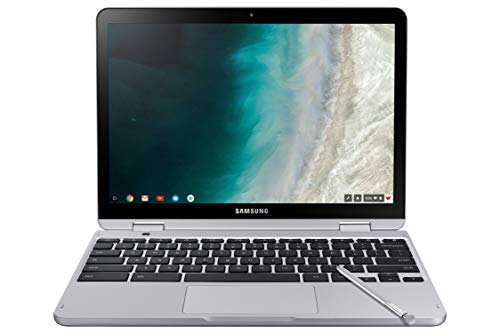
Samsung Chromebook Plus V2 12-inch
Ideal for mainstream users who value solid reviews, the 12‑inch Plus V2 costs roughly $620 less than the Galaxy XE930QCA, offering reliable performance at a friendlier price.
Samsung Galaxy Chromebook 13.3
Its ultra‑slim 0.39 in profile delivers a premium, portable experience that the bulkier Galaxy XE930QCA and the longer‑lasting Plus V2 don’t provide.
Also considered
Score Analysis
Key score advantages vs. runner-up (Samsung Chromebook Plus)
Price Range
Samsung Galaxy Chromebook XE930QCA
$863.44
Samsung Chromebook Plus V2 12-inch
$243.49
Samsung Galaxy Chromebook 13.3
$599.99

Samsung Chromebook 3
$198.00

Samsung Chromebook 4
$89.00

Samsung Galaxy Chromebook Go
$187.99
Spec Comparison
TL;DR: The Samsung Galaxy Chromebook XE930QCA packs a 13.3‑inch 4K AMOLED screen, 8 GB RAM and a built‑in stylus in a lightweight 2.29‑lb aluminum body, but its battery lasts only about six hours.
The standout feature is the 13.3‑inch 4K AMOLED touchscreen that delivers 3840 × 2160 resolution, 100% Adobe RGB and 100% DCI‑P3 color coverage, and a brightness of 360 nits. Combined with a 4096‑level pressure stylus and tilt support, it offers a desktop‑grade drawing experience on a Chromebook.
Compared with the other five Chromebooks in this roundup, the Galaxy Chromebook matches the Samsung Galaxy Chromebook 13.3 at 2.29 lb, but its 360‑nit panel falls short of that model’s ≥500 nits. It’s lighter than the Chromebook Plus V2 (2.98 lb) and far lighter than the Chromebook 4 (3.7 lb). Battery endurance falls short of the Galaxy Chromebook Go’s 12‑hour claim and the Plus V2’s 10‑hour optimal life, though the manufacturer lists up to an 8‑hour charge.
Reviewers consistently praise the vivid display and buttery trackpad, while noting that the device can get warm under sustained workloads and that the shallow keyboard travel feels cramped during long typing sessions. Professional outlets also highlight the fast 6‑second boot, the Intel Core i5‑10210U with 4 cores/8 threads, 8 GB LPDDR3 RAM, and 256 GB NVMe SSD as solid for everyday Chrome OS tasks.
Pros
Cons
Best for: Creative professionals and students who need a color‑accurate 4K touchscreen with stylus support.
Avoid if: You require all‑day battery life or a deep‑travel keyboard for long typing sessions.
“The screen is simply perfection... but the battery life keeps it from being a 5-star device.”
“The colors pop”
TL;DR: The Samsung Chromebook Plus V2 offers a 12.2‑inch 1920×1200 touchscreen with an integrated active stylus, 64 GB storage and a 10‑hour advertised battery, all in a lightweight 2.98‑lb convertible.
The standout feature is the built‑in active stylus with pressure sensitivity and palm‑rejection, which Samsung houses inside the 12.2‑inch glossy WUXGA display (1920 × 1200). At 2.98 pounds (1352 g) and only 17.0 mm thick, it’s a truly portable 2‑in‑1, and Samsung advertises up to 10 hours of use on a 39 Wh battery.
Compared with the other five Chromebooks in this roundup, the Plus V2 sits in the middle of the pack. It’s heavier than the 2.54‑pound Chromebook 3 but lighter than the 3.2‑pound Galaxy Chromebook Go and the 3.7‑pound Chromebook 4. Its 12.2‑inch screen is larger than the 11.6‑inch panels on the Chromebook 3 and Chromebook 4, yet smaller than the 13.3‑inch display on the Galaxy Chromebook. Battery life claims (10 hours optimal, 5.25 hours video) are just under the 11‑hour claim of the Chromebook 3 and the 12‑hour life of the Galaxy Chromebook Go, while video playback aligns with the 5.9‑hour figure of the Galaxy Chromebook 13.3. Storage-wise, 64 GB eMMC beats the 16 GB in the Chromebook 3 and the 32 GB in the Chromebook 4, and the device supports microSD cards up to 400 GB—something the peers don’t list. RAM is 4 GB LPDDR3, matching the 4 GB in the Chromebook 4 and doubling the 2 GB in the Chromebook 3.
Reviewers consistently praise the crisp 1920×1200 screen and the convenience of the integrated stylus, noting it shines in classroom and note‑taking scenarios. However, they also point out that battery life drops to around 5 hours under video playback, and the shallow‑travel keyboard feels cramped for extended typing. Professional reviewers highlight the fanless, sturdy build and the solid performance for web‑based tasks, though they mention the touchpad is small and less responsive.
Pros
Cons
Best for: Students and educators who need a lightweight convertible with a built‑in stylus and a crisp high‑resolution display.
Avoid if: You're shopping on a tight budget — it's priced at $243.49.
“Still trying to figure it out—it’s a little hard to figure out, it’s not like a regular computer, a little bit of pain in the butt.”
TL;DR: The Samsung Galaxy Chromebook 13.3 packs a 4K AMOLED screen, built‑in stylus and 8 GB RAM into a 2.29‑lb aluminum body, but its roughly 6‑hour battery may limit all‑day use.
The standout feature is the 13.3‑in 4K AMOLED display, offering a resolution of 3840 × 2160, ≥500 nits of brightness and 100% DCI‑P3 color gamut. That combination delivers vivid, true‑to‑life colors that reviewers repeatedly highlight as “breathtaking.” Coupled with a built‑in capacitive stylus, the screen becomes a solid choice for sketching or note‑taking on the go.
At 2.29 lb and 0.38 in thick, this Chromebook's lighter than the Chromebook Plus V2 (2.98 lb) and the Galaxy Chromebook Go (3.2 lb), matching the weight of the higher‑priced Galaxy Chromebook XE930QCA. Battery life sits at about 5.9 hours, which aligns with the XE930QCA’s 5 h 55 m but trails the Go’s 12‑hour endurance and the Plus V2’s advertised 10‑hour optimum run‑time.
Professional reviewers praise the responsive Core i5‑10210U processor (1.6 GHz base, up to 4.2 GHz turbo), 8 GB LPDDR3 RAM and a 256 GB NVMe SSD for smooth Chrome OS performance. The aluminum unibody, dual front‑facing speakers and Wi‑Fi 6 connectivity round out a premium package, though users note the front camera lacks a privacy shutter and the device runs warm during extended sessions.
Pros
Cons
Best for: Students, educators and creative professionals who value a portable, stylus‑enabled device with a premium 4K screen.
Avoid if: You need all‑day battery life, a built‑in HDMI port, or a webcam with a privacy shutter.
“The screen is simply perfection... but the battery life keeps it from being a 5-star device.”
“The colors pop”
TL;DR: The Samsung Chromebook 3 delivers up to 11 hours of battery life in a lightweight 2.54 lb, 11.6‑inch package, but its 16 GB storage and 2 GB RAM limit heavy multitasking.
The standout spec is its battery endurance—up to 11 hours on a single charge—paired with a compact 11.6‑inch HD LED matte display and a chassis that weighs just 2.54 pounds. The Intel Celeron N3060 runs at a base 1.6 GHz and can boost to 2.48 GHz, while the device ships with 2 GB DDR3 RAM and 16 GB eMMC storage.
Compared with the other five Samsung Chromebooks in this roundup, the Chromebook 3 is lighter than the Chromebook Plus V2 (2.98 lb) and the Galaxy Chromebook Go (3.2 lb), though a touch heavier than the Galaxy Chromebook 13.3 (2.29 lb). Its 11‑hour battery outlasts the Plus V2’s advertised 10 hours and the XE930QCA’s up‑to‑8 hours, yet falls short of the Go’s 12 hours and the Chromebook 4’s up‑to‑12.5 hours. Storage is modest at 16 GB eMMC, noticeably less than the Chromebook 4’s 32 GB, and the 2 GB RAM is half of the 4 GB found in that same model.
Reviewers consistently praise the spill‑resistant full‑size keyboard, the instant boot experience, and the reliable 802.11ac Wi‑Fi that keeps web sessions smooth. Professional reviewers note that the device “offers competent performance for browsing and basic applications,” but they also flag the limited storage and the modest Celeron processor as bottlenecks when many tabs are open. Users appreciate the lightweight build for school bags and travel, while some complain about the dim HD display and occasional fan noise under load.
Pros
Cons
Best for: Most users looking for a well‑reviewed, reliable mainstream option
Avoid if: You need advanced features or professional‑grade performance
“Still trying to figure it out—it’s a little hard to figure out, it’s not like a regular computer, a little bit of pain in the butt.”
TL;DR: The Samsung Chromebook 4 delivers an 11.6‑inch, MIL‑STD‑810G‑tested laptop for $89.99 with up to 12.5 hours of battery life, though its 4 GB RAM and 32 GB storage keep it firmly in the budget lane.
At $89.99, the Chromebook 4 is the most affordable entry in this Samsung lineup, and its battery lasts up to 12.5 hours—slightly longer than the 12‑hour claim on the Galaxy Chromebook Go. The device packs an Intel Celeron N4000 processor, 4 GB LPDDR4 RAM and 32 GB eMMC storage, all housed in a 3.7‑pound, 76.2 mm‑thick chassis with an 11.6‑inch anti‑reflective matte display.
When you line it up against the other five Chromebooks, the Chromebook 4 is heavier than the Galaxy Chromebook Go (3.2 pounds) and the Chromebook 3 (2.54 pounds), and it’s also thicker than every peer listed. Its depth of 508 mm makes it deeper than the 327 mm depth of the Go and the roughly 300 mm depths of the larger Galaxy models. On the upside, none of the competitors match its sub‑$90 price point, and its battery life edges out the Go’s 12‑hour figure.
Reviewers consistently praise the device’s portability and all‑day battery, noting that students love the spill‑resistant keyboard and the MIL‑STD‑810G durability rating. Professional reviewers highlight the improved Celeron performance over earlier Exynos‑based Chromebooks, while also flagging the 4 GB RAM ceiling and the modest 32 GB eMMC as limiting factors for heavy multitasking or large offline file collections. The TN LCD panel appears dim with narrow viewing angles, which aligns with the common complaint about muted colors.
In practice, the Chromebook 4’s Intel Celeron N4000 and UHD Graphics 600 handle 4K streaming smoothly, and the inclusion of a microSD slot that supports up to 512 GB gives you a way around the internal storage constraint. Connectivity includes Bluetooth 4.0, a USB‑C 3.0 port for data and charging, a USB‑A 3.0 port, HDMI out, and a headphone/microphone combo jack, covering most everyday needs.
Pros
Cons
Best for: Shoppers on a tight budget who want the most for their money
Avoid if: You need advanced features or professional‑grade performance
“Still trying to figure it out—it’s a little hard to figure out, it’s not like a regular computer, a little bit of pain in the butt.”
TL;DR: The Samsung Galaxy Chromebook Go offers a 14‑inch HD screen, 12‑hour battery, and rugged MIL‑STD‑810G build for $179, but its low‑brightness display and modest Celeron CPU limit performance.
At 3.2 pounds (1 451 g) the Galaxy Chromebook Go feels solid yet portable, and its 14.0‑inch LCD panel gives you more real‑estate than the typical 11‑inch budget Chromebook. The 12‑hour battery life comes from a 42.3 Wh cell paired with a 45 W USB‑C charger, so you can easily make it through a full day of classes or meetings.
Compared with the other five Samsung Chromebooks in this roundup, the Go is heavier than the Chromebook 3 (2.54 lb) and the Chromebook Plus V2 (2.98 lb) but lighter than the Chromebook 4 (3.7 lb). Its 14‑inch display outstrips the 11.6‑inch screens on the Chromebook 3 and Chromebook 4, and even beats the 13.3‑inch Galaxy Chromebook’s brighter panel (≥500 nits) by offering a larger surface, though at only 220 nits it’s dimmer. Battery life tops the Chromebook 3’s 11 hours and the Plus V2’s 10 hours, matching the Chromebook 4’s 12.5 hours while far exceeding the 5.9‑hour life of the premium Galaxy Chromebook 13.3 and the roughly 6‑hour life of the XE930QCA model.
Professional reviewers note the all‑day battery and the comfortable full‑size keyboard as strong points, and users frequently praise the MIL‑STD‑810G durability and optional LTE connectivity for on‑the‑go learning. The most common complaints focus on the low‑resolution 1366 × 768 screen and its modest 220‑nit brightness, as well as the Intel Celeron N4500’s 1.10 GHz base clock that can feel sluggish with many Chrome tabs or Android apps. Users also describe the trackpad’s click‑ability as inconsistent, and the lack of an HDMI port limits external display options.
The Go runs on an Intel Celeron N4500 (1.10 GHz base, 2.80 GHz turbo) with 4 GB LPDDR4x RAM and 64 GB eMMC storage, you can expand storage via microSD up to 1 TB. Connectivity includes Wi‑Fi 6, Bluetooth 5.1, and a nano‑SIM slot for LTE, while the dual USB‑C ports handle charging, data, and display output. These specs make it a well‑rounded entry‑level Chromebook for web‑centric tasks.
Pros
Cons
Best for: Entry‑level buyers or those on a tight budget
Avoid if: You need advanced features or professional‑grade performance
“The screen is simply perfection... but the battery life keeps it from being a 5-star device.”
“The colors pop”
Breakdown
Samsung Galaxy Chromebook XE930QCA
Pros
Cons
Samsung Chromebook Plus V2 12-inch
Pros
Cons
Samsung Galaxy Chromebook 13.3
Pros
Cons
Samsung Chromebook 3
Pros
Based on scoring data and product specs
Personalized picks
Best Overall Pick
Samsung Galaxy Chromebook XE930QCA
Best OverallBest for: Audiophiles and enthusiasts seeking premium sound quality and advanced features
Samsung Chromebook Plus V2 12-inch
Best for: Most users looking for a well-reviewed, reliable mainstream option
$243.49-$619.95 vs winner
Skip Samsung Galaxy Chromebook Go if…
You need advanced features or professional-grade performance
The Samsung Galaxy Chromebook XE930QCA takes the top spot thanks to its stunning 13.3‑inch 4K AMOLED display, a rapid 6‑second boot, and a solid 8 GB of RAM paired with a 256 GB NVMe SSD. At just 2.29 lb it stays portable, while Wi‑Fi 6 and Bluetooth 5.0 keep you connected, and the average battery life of 5 h 55 m lets you work through most meetings.
The runner‑up, Samsung Chromebook Plus V2 12‑inch, shines as a flexible 2‑in‑1 with a built‑in active stylus for note‑taking or sketching. Its 12.2‑inch touchscreen and fanless design feature an advertised 10‑hour battery life, making it ideal for students or creators on the move.
For tighter budgets, the Samsung Chromebook 4 offers the most affordable entry point at $89.99, well suited to basic web browsing and media consumption. If you want a balanced mid‑range option, the Chromebook Plus V2 delivers a convertible form factor, stylus support, and solid performance without breaking the bank.
Choose the Galaxy Chromebook XE930QCA for premium power, or opt for the Plus V2 or Chromebook 4 to match your budget and needs.
The Samsung Galaxy Chromebook XE930QCA features a 13.3‑inch 4K AMOLED panel with a 3840 × 2160 resolution, 100 % Adobe RGB and 100 % DCI‑P3 color gamut, and 360 nits of brightness, making it far superior for color‑critical tasks. Its premium display comes at a price of $863.44, which reflects its high‑end visual capabilities.
Please sign in to leave a review
No reviews yet. Be the first to review!
