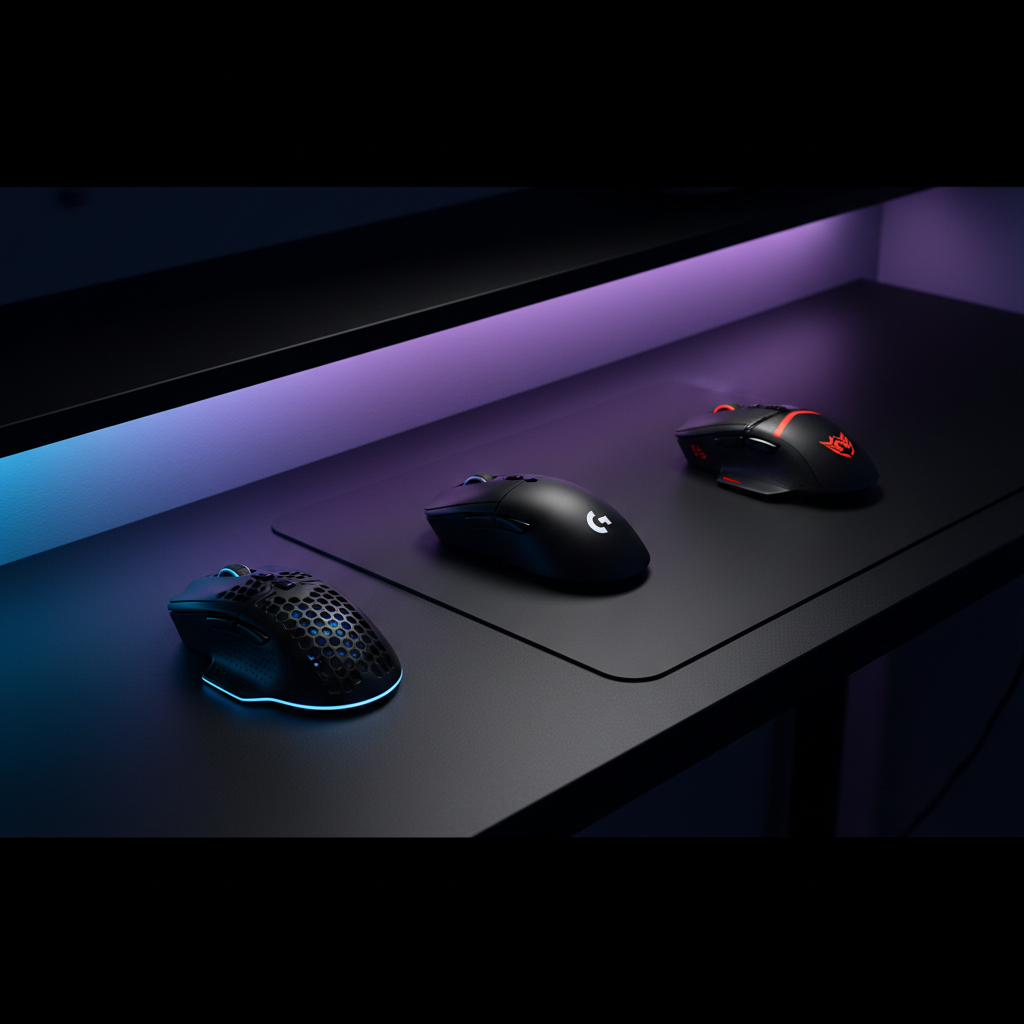
When you’re chasing split‑second reflexes, every gram counts. That’s why we compared 14 ultralight gaming mice, spanning a price range from $23.74 for the Redragon M916 up to $129.99 for the Logitech G PRO X Superlight 2. All of these models weigh under 60 g, and they each carry a strong community rating – for example, the Cooler Master MM710 scores 4.5/5 from 498 reviews while the Razer Cobra edges ahead with 4.6/5 from 1,820 reviewers.
We split our roundup into three price tiers. In the budget bucket (Redragon M916, Cooler Master MM710, ASUS TUF Gaming M3 Gen II, Razer Cobra) the MM710 stands out with a feather‑light 53.86 g chassis and a $24.99 price tag, making it the best value. The mid‑range tier (Manbasnake Attack Shark X3, Magic‑refiner Attack Shark X11) sees the X11 shine thanks to its 59 g weight, 90‑hour battery life and a $39.99 list price. For premium seekers (Cooler Master MM712, ASUS Harpe Ace Aim Lab Black, Corsair Sabre v2 PRO Ultralight, Logitech G PRO X Superlight 2) the Superlight 2 leads with a 60 g build, HERO 25K sensor and up to 70 hours of wireless endurance at $129.99.
Below we break down each tier and explain which mouse earns the top spot for your play style.

Cooler Master MM710
Features six programmable buttons and a 20 million‑click switch rating, delivering ample customization and durability for entry‑level gamers.

Logitech G PRO X Superlight 2
Ideal for competitive players who prioritize performance, but it costs about $105 more than the $24.99 MM710.

ASUS ROG Harpe Ace Aim Lab Black
Stands out with Bluetooth 5.1 and a 90‑hour battery, giving true wireless freedom the others lack.
Also considered
Score Analysis
Key score advantages vs. runner-up (Logitech G PRO)
Price Range
Cooler Master MM710
$24.99
Logitech G PRO X Superlight 2
$148.99
ASUS ROG Harpe Ace Aim Lab Black
$79.99

ASUS TUF Gaming M3 Gen II
$22.99

Magic-refiner Attack Shark X11
$31.99
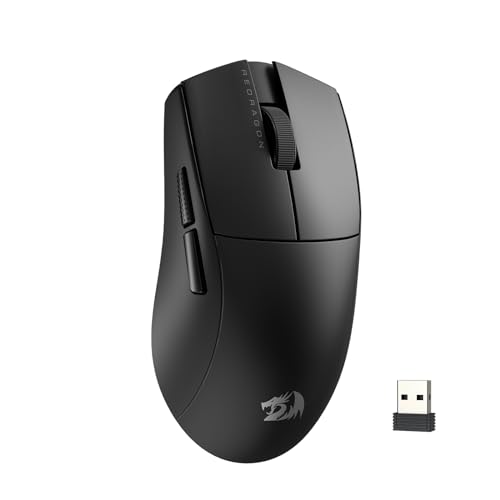
Redragon M916
$23.74
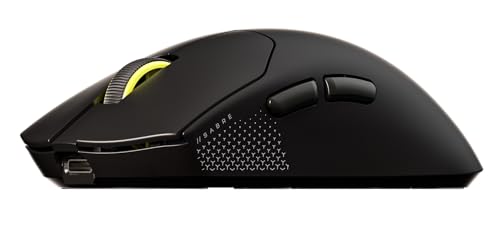
Corsair Sabre v2 PRO
$79.99

Razer Cobra
$30.99

Manbasnake Attack Shark X3
$41.99

Cooler Master MM712
$49.99

Attack Shark R1
$32.99

Razer Viper V3 Pro
$119.99

Turtle Beach Pure Air
$88.60

HyperX Pulsefire Haste 2
$39.99
Spec Comparison
TL;DR: The Cooler Master MM710 delivers ultra‑light 53.86 g performance at $24.99, earning 4.5 / 5 stars from 498 reviewers, making it a solid budget pick for fast‑paced FPS gamers.
The standout feature of the MM710 is its honeycomb‑shell chassis that brings the mouse down to just 53.86 g. Coupled with a PixArt PMW3389 optical sensor that tops out at 16000 DPI, the mouse offers the precision competitive shooters crave, while the <2 mm lift‑off distance helps maintain steadiness during rapid flicks.
In the broader roundup, the MM710 is lighter than the ASUS TUF Gaming M3 Gen II (0.260 lb) and the Razer Cobra (0.1275 lb), but a shade heavier than the Redragon M916 (0.108 lb) and the Manbasnake Attack Shark X3 (0.108 lb). It shares a 1000 Hz polling rate with the ASUS and Attack Shark R1, yet falls short of Redragon’s 8000 Hz. Its 16000 DPI sits between ASUS’s 8000 DPI and Redragon’s 30000 DPI, while the 50 g acceleration matches Redragon and exceeds the ASUS’s 30 G.
Reviewers consistently praise the mouse’s feather‑light feel and the smooth glide from PTFE feet on the Ultraweave cable. Professional outlets note the reliable 20 million‑click switch rating and the 512 KB onboard memory for profile storage. However, users note that the honeycomb shell can let dust in, and early production runs sometimes suffered from button wobble. The lack of left‑handed side buttons also draws criticism from left‑handed gamers.
Beyond the core specs, the MM710 offers six programmable buttons, a 1.8 m fixed Ultraweave cable, and a 2‑year warranty. Its 400 ips tracking speed and 1000 Hz polling ensure responsive cursor movement, while the 512 KB memory lets you save settings directly on the mouse—handy for LAN parties where software installation isn’t possible.
Pros
Cons
Best for: Competitive FPS gamers with small to medium hands who prioritize speed, precision, and a low‑profile mouse.
Avoid if: You are left‑handed, have large hands, or require customizable RGB lighting.
“It feels like 10 nickels in my hand – truly game‑changing.”
“A mouse that gets out of the way.”
TL;DR: The Logitech G PRO X Superlight 2 weighs just 60 g (0.1322773572 lb), offers a HERO 2 sensor up to 44,000 DPI, 8000 Hz polling and up to 70 hours of battery, but commands a $129.99 premium price.
This mouse’s most striking spec is its ultra‑light 60 g (0.1322773572 lb) chassis, which pairs with the HERO 2 sensor that pushes a maximum of 44,000 DPI and a tracking speed beyond 888 IPS. The LIGHTSPEED 2.4 GHz wireless link runs at an 8000 Hz polling rate, and the built‑in rechargeable lithium‑polymer cell delivers up to 70 hours of playtime on a single charge.
Within the 14‑product roundup, the Superlight 2 weighs more than the Razer Viper V3 Pro (0.119 lb) and the Corsair Sabre v2 PRO Ultralight (0.079 lb), yet it's lighter than the Cooler Master MM712 (0.139 lb). Its $129.99 list price puts it at the premium end of the lineup, making it pricier than many of its ultralight peers.
Reviewers consistently praise the feather‑light feel, noting reduced wrist fatigue during long sessions, and they highlight the flawless sensor performance and long battery life. Common complaints focus on the compact 40 mm height and 125 mm length, which some large‑handed users find cramped, the limited five programmable buttons, and the lack of Bluetooth for multi‑device convenience.
Additional technical touches include LIGHTFORCE hybrid switches rated for 50 million clicks, large zero‑additive PTFE skates (with an extra cap included), and onboard memory that stores up to five hardware profiles via Logitech G HUB. The mouse also supports POWERPLAY wireless charging, adding convenience for competitive play.
Pros
Cons
Best for: Buyers willing to invest in a proven, high-quality option
Avoid if: You're shopping on a tight budget — it's priced at $129.99
“Feels like it disappears in your hand.”
“Perfect for long gaming sessions — no wrist fatigue.”
TL;DR: The ASUS ROG Harpe Ace Aim Lab Edition delivers a feather‑light 54 g chassis, 36,000 DPI sensor and 90‑hour battery, but its 1,000 Hz polling and limited RGB may deter power users.
This mouse’s standout spec is its ultra‑light 54 g weight combined with a 36,000 DPI ROG AimPoint Optical Sensor that offers <1% CPI deviation. The 70 million‑click ROG Micro Switches and five programmable buttons give you crisp actuation for fast flick shots.
At 0.12 pounds, the Harpe Ace’s weight is heavier than the Corsair Sabre v2 PRO Ultralight’s 0.079 pounds but still lighter than the Cooler Master MM712’s 0.13889122506 pounds. Its 90‑hour battery outlasts the Turtle Beach Pure Air’s 0.12 pounds‑weight counterpart and exceeds the Magic‑refiner Attack Shark X11’s 60‑hour runtime, though it sits below the Cooler Master’s 180‑hour Bluetooth claim.
Reviewers love the feather‑light feel and the Aim Lab Settings Optimizer that fine‑tunes sensitivity, calling the sensor “exceptionally accurate.” However, several users note Armoury Crate may become unstable on Windows 10, and the single LED zone on the scroll wheel leaves ROG fans wanting more lighting. The shape, optimized for claw and fingertip grips, may feel cramped for palm‑grip players.
Additional technical highlights include Bluetooth 5.1 connectivity, a 2 m braided USB‑C cable, and a maximum acceleration of 50 g. The 1,000 Hz polling rate is solid for most esports titles, while the 650 IPS maximum speed ensures swift cursor movement.
Pros
Cons
Best for: Competitive FPS players and esports athletes who prioritize ultra‑lightweight precision and long battery life.
Avoid if: You prefer a heavier, palm‑grip‑friendly mouse, need extensive RGB lighting, or are on a tight budget.
“The lightness makes a huge difference in tracking and flick shots.”
“The Aim Lab optimizer actually helped me find my perfect DPI.”
TL;DR: The ASUS TUF Gaming M3 Gen II offers a 118 g ultra‑light chassis, 8000 DPI optical sensor and 1000 Hz polling for $24.99, but its Armoury Crate software can feel heavy.
The standout spec is the 118 g weight (0.26014546916Pounds) combined with a 1000 Hz polling rate and a maximum DPI of 8000, which places it squarely in the ultralight, high‑response tier for wired gaming mice. Its PAW3318 optical sensor delivers up to 200 IPS tracking speed and 30 G acceleration, while the six programmable buttons and three onboard memory profiles let you store custom setups without leaving the desk.
Compared with the other 13 entries, the M3 Gen II is heavier than the ultralight Cooler Master MM710 (0.11875Pounds) and Redragon M916 (0.10802650838Pounds), but it still stays under a third of a pound. Its 1.8 m cable matches the MM710’s length, and the six programmable buttons equal the MM710 and Attack Shark R1 (0.1212542441Pounds) while exceeding Redragon’s five. The 1000 Hz polling aligns with Attack Shark R1, yet it falls short of Redragon’s 8000 Hz. Acceleration at 30 G is lower than the 50 G seen in the MM710 and Redragon, and also below the 40 G of Attack Shark R1, indicating a modest trade‑off for its price.
User feedback repeatedly praises the mouse’s feather‑light feel and precise tracking, noting that the right‑handed ergonomic shell accommodates palm, claw and fingertip grips comfortably. Professional reviewers highlight the IP56 dust‑ and water‑resistance and the silver‑ion antibacterial coating that “inhibits >99% bacterial growth over 24h,” a rarity in sub‑$60 mice. However, many users flag the mandatory Armoury Crate software as bloated and the stiff rubber cable as a source of pull when lifting the mouse.
Pros
Cons
Best for: Competitive FPS and MOBA gamers who want a budget‑friendly, lightweight wired mouse.
Avoid if: You have large hands, rely on a palm grip, or dislike installing proprietary software.
TL;DR: The Magic‑refiner Attack Shark X11 delivers a feather‑light 59 g chassis, 22,000 DPI sensor and 60‑hour battery life, all wrapped in a tri‑mode wireless package with a magnetic RGB charging dock.
What really sets the Attack Shark X11 apart is its combination of ultra‑lightweight construction (0.13007273458 lb) and high‑performance specs. The PixArt PAW3311 optical sensor tops out at 22,000 DPI, paired with a 1000 Hz (1 ms) polling rate, 35 g acceleration and six adjustable DPI levels. Battery endurance reaches up to 60 hours on a full charge, and a rapid 10‑minute fast charge adds an extra 5 hours of playtime. The mouse also supports tri‑mode connectivity—Bluetooth, 2.4 GHz wireless via a USB nano receiver, and wired USB‑C—plus a magnetic RGB charging dock that adds a premium feel at its $39.99 price point.
In the context of the 13‑mouse roundup, the X11 is heavier than the Manbasnake Attack Shark X3, Attack Shark R1, Razer Cobra and Cooler Master MM710, but lighter than the Cooler Master MM712 and ASUS TUF Gaming M3 Gen II. Its 60‑hour battery life sits just below the 65‑hour claim of the Attack Shark R1 and the 80‑hour (2.4 GHz) figure of the Cooler Master MM712, yet it outlasts many wired competitors. The 22,000 DPI ceiling also exceeds the 18,000 DPI maximum of the Attack Shark R1, positioning the X11 among the highest‑resolution sensors in this group.
User feedback consistently praises the mouse’s comfort and the “feather‑light” feel that aids quick flicks in FPS and RTS titles. Reviewers highlight the magnetic charging dock as a standout feature at this price tier, and the PixArt sensor is lauded for its accuracy and consistency. On the flip side, several owners find the driver software unintuitive and note that the five programmable buttons fall short of the six‑button layouts seen on some rivals. The RGB lighting, while present on both mouse and dock, offers only a basic effect rather than a deep customization suite.
Beyond the headline specs, the X11 includes double‑layer PTFE mouse feet for smooth gliding, HUANO micro switches rated for 20 million clicks, and non‑slip grip tape that improves handling during long sessions. The right‑handed ergonomic shape works well for palm and fingertip grips, though users with very small hands have reported the overall size feels a bit large for claw‑style grips.
Pros
Cons
Best for: Competitive gamers (FPS, RTS, MOBA) who need a feather‑light, responsive mouse with long battery life and versatile connectivity.
Avoid if: You have a small hand preferring claw grip, require deep RGB customization, or need more programmable buttons for complex macros.
“The driver software is confusing and not user‑friendly.”
“Comfort during long sessions and smooth tracking.”
TL;DR: The Redragon M916 packs a feather‑light 49 g frame, up to 30,000 DPI and an 8,000 Hz polling rate for just $23.74, though its plastic shell feels cheap.
The standout spec is its ultra‑light 49 g weight paired with a maximum DPI of 30,000 and a blistering 8,000 Hz polling rate, which the Pixart PAW3950 sensor drives. Those numbers put it in the same performance league as much pricier flagship mice.
Compared with the other 13 entries, the M916 is lighter than the ASUS TUF Gaming M3 Gen II, the Razer Cobra and the Attack Shark R1, and even edges out the Cooler Master MM710’s 53.86 g. Its 8,000 Hz polling rate dwarfs the 1,000 Hz rates listed for ASUS, Attack Shark R1 and the typical 1,000 Hz seen on many peers. Acceleration at 50 g matches the Cooler Master but surpasses the 30 g of ASUS and the 40 g of Attack Shark R1.
Users consistently praise the mouse’s performance‑to‑price ratio, noting the 49 g feel gives a noticeable advantage in fast‑paced FPS titles. However, many point out that the plastic shell wears quickly and can become slippery, while the rear‑mounted battery makes the mouse feel tail‑heavy. Users report the stock PTFE feet generate higher friction than expected, and the Windows‑only Redragon driver doesn’t allow customization for macOS or Linux users.
Additional technical notes: the M916 offers five programmable buttons, Huano Blue Dot mechanical switches, and an adjustable lift‑off distance down to 0.7 mm. It supports Bluetooth, 2.4 GHz wireless, and wired USB‑C connections, and its RGB lighting can display 16.8 million colors.
Pros
Cons
Best for: Budget‑conscious competitive gamers who need a feather‑light mouse with ultra‑high polling rates and flexible connectivity, especially on the go.
Avoid if: You demand premium build quality, macOS/Linux software support, onboard profile storage, or don’t need ultra‑high polling rates.
“Best mouse for the price”
TL;DR: The Corsair Sabre V2 Pro Ultralight delivers a feather‑weight 36 g build, up to 33,000 DPI sensor and 8,000 Hz polling, but its $99.99 price and single onboard profile may limit budget‑focused or multi‑PC users.
This mouse’s standout spec is its 36 g weight combined with the Corsair Marksman S optical sensor that reaches 33,000 DPI and supports an 8,000 Hz hyper‑polling rate. The wireless 2.4 GHz link promises ultra‑low latency, while the battery can last up to 70 hours at 1,000 Hz or 16 hours when you push the 8,000 Hz mode.
In the context of the other 13 ultralight contenders, the Sabre V2 Pro is lighter than the ASUS Harpe Ace (0.12 lb) and the Razer Viper V3 Pro (≈0.119 lb), and it undercuts the Logitech G PRO X Superlight 2 (≈0.132 lb) as well as the Cooler Master MM712 (≈0.139 lb). Its dimensions—58 mm grip width, 38.21 mm height, 119.16 mm length—are a touch smaller than the ASUS’s 39.6 mm height and 127.5 mm length, and its width of 62.55 mm is marginally narrower than ASUS’s 63.7 mm. Battery life sits a bit below the ASUS’s 90‑hour claim, but matches the Logitech’s 70‑hour figure. Both the Sabre and ASUS share a 50 G max acceleration, though the Sabre edges ahead on tracking speed with 750 IPS versus ASUS’s 650 IPS.
Reviewers consistently praise the near‑weightless feel and the included grip‑tape that adds comfort without extra cost. Professionals note the “notable weight‑to‑performance ratio” and “sturdy build despite low weight.” Users love the wireless reliability at lower polling rates, but many mention that the UPE feet can feel overly slippery on certain mousepads. The mouse stores only one profile in onboard memory, and there’s no dedicated DPI button, meaning you must use button combos to adjust sensitivity.
Pros
Cons
Best for: Competitive FPS and esports players who need ultra‑low weight and high polling rates.
Avoid if: You're shopping on a tight budget — it's priced at $99.99, or if you need multiple onboard profiles, Bluetooth connectivity, or a heavier mouse for steadier aim.
“a mouse that can truly lay claim to the ‘ultralight’ title”
“feels like an extension of your hand”
TL;DR: At $30.99, the Razer Cobra earns a 4.6‑star rating from 1,820 reviewers, praised for its lightweight feel and solid build, though some note the lack of left‑handed support.
The Razer Cobra comes from the well‑known Razer brand and costs $30.99, placing it firmly in the budget‑friendly segment of this 14‑product roundup. Its 4.6‑star rating from 1,820 reviews ranks it among the higher‑rated mice in the list, suggesting strong satisfaction among buyers.
Users consistently highlight the mouse’s ultra‑light construction, fast click response, and vivid RGB lighting as standout qualities that enhance both comfort and visual appeal. Many mention that the light weight helps reduce fatigue during long sessions, while the durable switches give confidence for rapid clicking. A few reviewers point out an adjustment period to the very light feel, and some wish for a left‑handed version or additional onboard profiles for deeper customization.
Based purely on price and rating, the Cobra offers a compelling option for gamers who want a reputable brand and positive community feedback without breaking the bank. It sits comfortably between higher‑priced premium models and the lower‑end alternatives, delivering solid value for its cost.
Pros
Cons
Best for: Budget-conscious buyers seeking a reliable entry-level option
“I love it.”
“Works great”
TL;DR: At $37.79, the Manbasnake Attack Shark X3 earns a 4.5‑star rating from 1,193 reviewers, who commend its feather‑light feel, solid performance and long battery life.
The Attack Shark X3 is Manbasnake’s entry in the ultralight gaming mouse segment, priced at $37.79 and sitting at rank #9 out of 14 competitors in this roundup. It carries a strong 4.5‑star average from more than a thousand users, indicating broad approval despite the limited publicly listed specifications.
Reviewers repeatedly highlight how the mouse’s light construction reduces hand fatigue during long sessions, while its battery endurance keeps it running for days without a charge. Users also appreciate the ability to switch between wireless and wired modes, though a few note occasional Bluetooth pairing hiccups on non‑Windows devices. The software suite functions, yet several commenters wish it were as refined as the tools offered by larger brands.
Based purely on price and rating, the Attack Shark X3 lands in the middle‑priced tier of the list, offering a well‑reviewed option for gamers who want a reputable brand without paying premium prices. Its solid score of 56/100 suggests it performs reliably, even if detailed specs remain scarce.
Pros
Cons
Best for: Most users looking for a well‑reviewed, reliable mainstream option
“The driver software is confusing and not user‑friendly.”
“Comfort during long sessions and smooth tracking.”
TL;DR: The Cooler Master MM712 is a sub‑59 g wireless mouse with a 19,000 DPI sensor, 180‑hour Bluetooth battery life, and six programmable buttons, but its $49.99 price and clunky software may deter budget‑focused buyers.
Weighing in at 0.13889122506 pounds (under 59 g) and measuring 38.3 mm × 62.4 mm × 116.5 mm, the MM712 packs a PixArt PAW3370 sensor that reaches 19,000 DPI. The ultra‑light shell and 95% PTFE mouse feet give you a friction‑free glide, while the 50 g acceleration and 400 ips tracking speed keep cursor movement razor‑sharp.
Compared with the other 13 contenders, the MM712 is a bit heavier than the HyperX Pulsefire Haste 2 (0.11464037624 lb) and the Razer Cobra (0.1275 lb), but still lighter than many full‑size rivals. Its Bluetooth endurance of 180 hours dwarfs the 60‑hour runtime of the Magic‑refiner Attack Shark X11 and the 65‑hour life of the Attack Shark R1, giving you weeks of uninterrupted play without recharging. The 80‑hour 2.4 GHz battery also outlasts most single‑mode mice in the lineup.
Reviewers consistently praise the feather‑light feel and the durability of the hole‑less shell, especially for claw and fingertip grips. The sensor’s high DPI and solid build get highlighted, but the MasterPlus+ software feels clunky and unintuitive, and users miss a precise battery‑percentage readout. The compact ambidextrous shape can feel cramped for larger palm‑grip hands.
Technical extras include six programmable buttons, a switch lifespan of 70 million clicks, and a lift‑off distance of 2 mm. The mouse ships with an ultraweave USB‑A‑to‑USB‑C cable that reaches 1.8 m, and a 2‑year warranty backs the build.
Pros
Cons
Best for: Competitive FPS and MOBA players who prioritize ultra‑light weight, long Bluetooth battery life, and precise sensor performance.
Avoid if: You have a large palm grip, need extensive RGB lighting, or rely on onboard profile storage.
“It feels like 10 nickels in my hand – truly game‑changing.”
“A mouse that gets out of the way.”
TL;DR: The Attack Shark R1 delivers a feather‑light 55 g build, 18,000 DPI sensor and 65‑hour wireless battery, offering a budget‑friendly edge for fast‑paced competitive play.
What really sets the R1 apart is its ultra‑light 55 g solid‑body chassis paired with a PixArt PAW3311 sensor that tops out at 18,000 DPI and runs at a 1,000 Hz polling rate. The mouse also houses HUYU micro switches rated for 20 million clicks and a TTC encoder for a premium scroll feel, giving you crisp response without extra weight.
Compared to the other entries in the 14‑mouse roundup, the R1 sits near the middle of the weight spectrum. It’s lighter than the ASUS TUF Gaming M3 Gen II (which weighs about 0.26 lb) but a touch heavier than the Cooler Master MM710’s 0.11875 lb, making it a solid compromise for users who want a lightweight feel without the honeycomb shell. Its 1,000 Hz polling matches the ASUS model, and its 40 G acceleration exceeds the ASUS’s 30 G while the Cooler Master and Redragon options offer 50 G.
Users consistently praise the R1’s feather‑light feel, noting that marathon sessions feel fatigue‑free. Reviewers highlight the TTC encoder and HUYU switches for a click that feels both crisp and reliable, and the 65‑hour battery life (charged in just 2 hours via USB‑C) frequently earns the description “impressive for a wireless mouse.” A recurring complaint is occasional Bluetooth pairing hiccups on non‑Windows platforms, and some buyers have pointed out a discrepancy between the listed 55 g and occasional reports of 59 g, suggesting a possible variant variance.
Pros
Cons
Best for: Competitive FPS/MOBA gamers, hybrid work‑gaming users, and travelers who need a lightweight, multi‑mode mouse.
Avoid if: You require onboard profile storage, need rock‑solid Bluetooth across every OS, or prefer a honeycomb‑style ultra‑light mouse.
“The driver software is confusing and not user‑friendly.”
“Comfort during long sessions and smooth tracking.”
TL;DR: The Razer Viper V3 Pro costs $129.89, carries a 4.6/5 rating from 1,906 reviewers, and is praised for its feather‑light feel and 8,000 Hz wireless polling, though its premium price and shorter battery life at max speed give some buyers pause.
Razer’s Viper V3 Pro lands in the high‑end corner of the ultralight gaming mouse segment, costs $129.89 and earns a 4.6‑star rating from nearly two thousand reviewers. In the 14‑product roundup it ranks among the pricier options, yet its rating ranks among the strongest, showing solid community approval.
Users repeatedly highlight how the mouse “disappears” in the hand thanks to its 54–55 g chassis, and they note the dramatic responsiveness of the 8,000 Hz wireless polling rate. Reviewers also commend the Focus Pro 35K sensor for flawless tracking even on glass, and they appreciate the 90 million‑click optical switches that stay crisp after months of play. On the downside, owners point out that battery life shrinks to about 17 hours when the mouse runs at full 8,000 Hz, and the bottom‑mounted DPI button feels awkward during fast adjustments. The lack of RGB lighting and any weight‑tuning options also draws criticism from users who expect more customization at this price point.
Competitive gamers who value the fastest wireless response and ultra‑light handling over aesthetic flair get a premium experience from the Viper V3 Pro. Its price puts it above budget‑friendly ultralights like the Corsair Sabre v2 PRO, but the combo of a top‑tier sensor, industry‑leading polling and Razer’s brand reputation justifies the higher cost for serious esports players.
Pros
Cons
Best for: Buyers willing to invest in a proven, high‑quality option
“It disappears in your hand—perfect for long sessions.”
“Tracking is flawless, even on my glass desk.”
TL;DR: At $59.99, the Turtle Beach Pure Air earns a 4.1‑star rating from over a thousand reviewers, praised for its featherlight feel, reliable wireless performance and solid battery life, though its small size may not suit larger hands.
The Turtle Beach Pure Air sits near the top of the price range in this 14‑item ultralight mouse roundup, ranking #13 with a 4.1‑out‑of‑5 rating based on 1,023 user reviews. Turtle Beach’s reputation for gaming audio carries over into its peripheral line, giving the mouse a solid brand pedigree.
Reviewers consistently highlight the mouse’s ultra‑light construction, describing it as “featherlight” and ideal for rapid flicks in fast‑paced shooters. The high‑precision sensor and dual wireless options (low‑latency 2.4 GHz and Bluetooth) receive praise for delivering smooth tracking and flexible connectivity. Battery longevity and a rapid‑charge feature keep sessions uninterrupted, while the TITAN optical switches feel crisp and durable. On the downside, users with larger hands find the compact shape uncomfortable, the Swarm II software can drop the connection after short idle periods, and the RGB lighting is described as subtle rather than vivid.
In the context of this lineup, the Pure Air offers premium features at a mid‑to‑high price point but falls short of the top‑ranked models in rating. It may appeal to gamers who value lightweight performance and battery endurance over flashy aesthetics.
Pros
Cons
Best for: Those prioritizing quality and willing to pay for premium performance
“featherlight”
“Swarm II software automatically disconnects after about 30 seconds of inactivity”
TL;DR: Priced at $59.99 with a 4.0‑star rating from 727 reviewers, the HyperX Pulsefire Haste 2 ranks 14th in our 14‑mouse roundup, earning praise for its featherlight feel while drawing some complaints about durability.
HyperX offers the HyperX Pulsefire Haste 2 at $59.99, and it holds a 4.0‑star rating across 727 user reviews, placing it at the bottom of our 14‑product lineup. Its price falls in the mid‑range for ultralight gaming mice.
Reviewers consistently highlight the mouse’s ultra‑light design and the speed they experience in fast‑paced games. Users also appreciate the mechanical switches, the customizable RGB lighting, and the ambidextrous shape that works for both left‑ and right‑handed gamers. On the downside, several owners mention that the honeycomb shell tends to collect dust, the cable can develop fraying over time, the lighting is modest, and the accompanying software sometimes shows connectivity hiccups.
Given its price and rating, the Pulsefire Haste 2 sits at the lower end of the ranking despite its strong brand reputation. Buyers looking for a reputable name and a light, responsive feel will find it appealing, though the lack of detailed published specs may make direct comparison with other models challenging.
Pros
Cons
Best for: Those prioritizing quality and willing to pay for premium performance
“"the best esports mouse to come along in some time"”
“"featherlight feel"”
Breakdown
Cooler Master MM710
Pros
Logitech G PRO X Superlight 2
Pros
Cons
ASUS ROG Harpe Ace Aim Lab Black
Pros
ASUS TUF Gaming M3 Gen II
Pros
Based on scoring data and product specs
Personalized picks
Best Overall Pick
Cooler Master MM710
Best OverallBest for: Entry-level buyers or those on a tight budget
Logitech G PRO X Superlight 2
Best for: Buyers willing to invest in a proven, high-quality option
$148.99+$124.00 vs winner
Skip HyperX Pulsefire Haste 2 if…
Reliability and user satisfaction are your top concerns
Cooler Master’s MM710 takes the top spot with a feather‑light 0.11875 pounds (53.86 g) chassis, a PixArt PMW3389 sensor that tops out at 16,000 DPI, and six programmable buttons—all carries a 2‑year warranty. Its 1000 Hz polling and <2 mm lift‑off distance feel instant, earning it the top rating.
The runner‑up, Logitech’s G PRO X Superlight 2, shines when you need wireless freedom without sacrificing performance. Weighing 0.1322773572 pounds (60 g) and offering up to 44,000 DPI, it also delivers up to 70 hours of battery life via a USB‑C charge, making it ideal for marathon sessions on the go.
For those on a tighter budget, the Redragon M916 at $23.74 provides solid ultralight performance at the lowest price point. If you want a step up without breaking the bank, the Magic‑refiner Attack Shark X11 at $39.99 balances price and features nicely. And for users who crave premium specs, the G PRO X Superlight 2 remains the top premium pick, delivering elite sensor performance and wireless convenience.
Pick the Cooler Master MM710 today and enjoy a truly lightweight, responsive gaming mouse right out of the box.
The Superlight 2 costs $129.99 versus $24.99 for the MM710, a $105 difference. It offers a higher maximum DPI of 44,000, up to 70 hours of battery life, and an 8,000 Hz polling rate, which may justify the price for competitive players who need those premium specs. If you prioritize pure value and a sub‑55 g weight, the MM710 remains the more economical choice.
Please sign in to leave a review
No reviews yet. Be the first to review!
